A.T.TIPSCAST Episode #89: Free Fraction Tools from ConceptuaMath
2 Replies

Despite having seen all the previous Mission Impossible movies, when I saw the preview for Mission Impossible: Ghost Protocol I thought, “Ick.” Then, when I heard from a few Twitter friends how much they enjoyed it, saw some additional television spots playing that catchy theme music, and noticed that it was directed by Brad Bird (The Incredibles, Ratatouille, The Iron Giant, etc.) I changed my mind. Still, I was thinking I’d add it to the Netflix queue and get around to seeing it a year or two from now.
Over the winter break my in-laws came into town giving my wife and I an opportunity to have a day out together. We did some shopping, grabbed a bite to eat, and went to see Mission Impossible for the heck of it. As it turns out, we both really enjoyed it.
What I found most interesting about the movie were the parallels in the story to building and maintaining an assistive technology team. Without providing any spoilers, the movie centers around a small team of professionals who use technology to overcome problem after problem in order to achieve their objectives. The team utilizes their different talents to assess each situation by analyzing their environment and then implementing technology to address the issues.
To me, this is exactly how a team of educators considers assistive technology for a student. The team analyzes the situation, determines what goals need to be met, and then decide what tools are necessary to address those goals.
Approximately half way through the movie the team of good guys realize that they will not be able to acquire any more resources. They are forced to find solutions using only what they have available to them. When implementing technology for a student, educators should first look to what they already have in their environment. Technology that is present and available to every student is always the best place to start and typically these tools are considered the least restrictive solutions. Furthermore, in the current fiscal environment of shrinking budgets, using what’s freely available first, before looking for external solutions that cost money, helps to keep funds available for when a student absolutely needs something to be purchased.
As the events of the plot unfold, the team finds that technology fails them…over and over again. As the technology fails, the team is forced to improvise to continue on their mission. Unfortunately, this holds true in the world of education as well. Technology breaks down and back-up plans needs to be implemented so students aren’t left floundering without the supports they need to help them achieve their goals. When the technology goes down, it’s up to the educational team to review, revise, and react, often in innovative ways, to make sure students succeed.
At the end, it’s no surprise, that Tom Cruise’s team is victorious. As team leader he gives a short speech explaining how proud he is of the team for their resiliency, collaboration, and never-give-up attitude. Even if you think the mission in front of you is impossible, whether it be stopping a terrorist from enacting his nefarious plot or assisting a student in achieving his or her educational goals, the edict is the same- failure is not an option.
Providing necessary technology to help students achieve their educational goals is your mission, and if you’re a good educational team, your only choice is to accept it.


Hi All,
This is Chris’ wife, Mel. I am hijacking his blog. How I got in here isn’t important . Let’s just say it took some gum, a ferret, and an accomplice to help me break in. Whew, I am feeling like a fish out of water in WordPress. It is fancy in here. Why am I here, you ask?
IT’S CHRIS’ BIRTHDAY!!!

Happy Birthday Chris! As part of your present, I collected some audio birthday messages for you! You will find the links below to hear them:
Sally and Molly’s Talking Tom app message – http://www.youtube.com/watch?v=FnKqOzD8nZs&feature=youtu.be
Sean’s Fotobabble message- http://www.fotobabble.com/m/Q1hrRXRFdFR3NDQ9
Patrick’s Vocaroo message- http://vocaroo.com/?media=vffbVuhcgcCbmh91z
Brian’s Songify App message- http://dl.dropbox.com/u/4768678/Happy%20Birthday%20Chris%21.mp3
Jeannette‘s Voice Memo message – http://dl.dropbox.com/u/4768678/Voice%20005.amr
Flanigan Family Vocaroo message- http://vocaroo.com/?media=v7rRkKrS5f4QPFTz7
Matt’s Vocaroo message from Paris- http://dl.dropbox.com/u/4768678/Memo.mp3
Night Light Stories Household’s Vocaroo message- http://vocaroo.com/?media=vzuonVBfIudEkmgU3
Darth Vader’s Birthday Message- http://www.youtube.com/watch?feature=player_embedded&v=dEWv19Eh8b8#!
Milliman Family Vocaroo message- http://vocaroo.com/?media=v1kHX1gadBEQDgtPE
Chris’s Voice Memo Message – http://dl.dropbox.com/u/4768678/happy%20happy.amr
Beth‘s WordFoto app Picture message –

Amy‘s Doodle Buddy App Picture Message –

Please feel free to leave a birthday wish for Chris in the comments! I know he would LOVE to hear from you!
Thanks for having me!
We now return you to your regularly scheduled blog!
 A.T.TIP #253 – Catch The Hoops


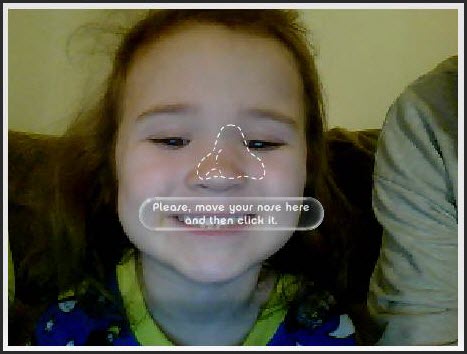
As a reminder of what was mentioned in Part 1, this is an example of a message where the user needs to allow the website access to the webcam.

 Episode #87 features a discussion of implementation strategies and resources for using free audio fiction in the classroom by special guest host Melissa Bugaj. She also blogs about family exploits and adventures at http://accordingtomags.blogspot.com.
Article: Listen Up – Using audio books to help improve reading
 The Compendium Blog of The A.T.TIPSCAST