Episode #37 is up for your listening pleasure! Episode #37 features Part 1 of a two part interview with Chris Cummins, a high school English teacher and adjunct professor at the State University of New York at Fredonia who is currently teaching a class on Literacy and Technology. During this first part of the interview Chris and I talk about a few different styles of graphic organizers as well as discuss how to implement graphic organizers in a high school setting.
I’ll be presenting at the National Educational Computing Conference (NECC)- June 28th – July 1st in Washington, D.C. (Poster Session: Chew the P.H.A.T-Policies and How-to’s in Assistive Technology with Sally Norton-Darr).
Contact Information-
If I don’t get to see you at NECC we can still connect virtually. Join the A.T.TIPPERS group on Facebook and/or Classroom 2.0 ! You can also follow me on twitter.com.
Leave a comment down below or drop me a line at attipscast@gmail.com. Let me know what you think of the show! You can access the podcast and register as a fan of the show from here:
Hey everyone,
Episode #11 is up for your listening pleasure. Episode #11 describes the autosummarize feature of MS Word. I realize that the episode is just a quick rundown of how the feature works and I didn’t really get into what you’d use it for. I’m trying to keep the tips quick. So, I invite you to tell me how you might use this feature or tell me how you have already used the feature. Your story might just inspire someone else in how they could use it. Please send me an e-mail, record a message and send it to me or post a comment here.
You can find whole tutorials on autosummarize for your version of MS Word here:
I hope you enjoyed the show and please feel free to leave a comment down below or drop me a line at attipscast@gmail.com
You can access the podcast from here:
Sorry this post is up about 24 hours late, but here it is!
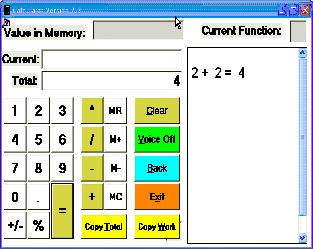
Episode #10 is up for your listening pleasure. Episode #10 describes the free software Talking Calculator. You can access a link for the free download from www.premierathome.com/products/TalkingCalculator.php.
Here is a screenshot of what it looks like once it is installed:
I hope you enjoyed the show and please feel free to leave a comment down below or drop me a line at attipscast@gmail.com
You can access the podcast from here:
This website is the personal website of a web designer named, Emily Change, out of San Francisco. There is so much out there and so many new web applications updating every day, this site can keep you up to date on the latest Web 2.0 applications.
This is a great resource to find free sounds. I think one under utilized activity for students with difficulties following directions or auditory processing difficulties is listening to and discriminating between sounds. Sounds can be used as story starters as opposed to the traditional text-based or picture based story starter. Sound effects can be used to enhance digital storytelling activities, movie making activities, or student produced podcasts. Adding these sounds might allow the students to feel like their production has a polished and fun quality.
Number 1- Mail Merge functions of Publisher to create Picture Dictionaries and Identification Cards
A teacher from Norfolk public schools named Jennifer Durkin presented on different ways she uses Publisher. One strategy she showed what how you could take lists of items in Excel and Merge them with templates created in Publisher to easily make picture dictionaries and identification cards. Picture dictionaries are a great way for students to review difficult spelling words, review vocabulary from any content area, or maintain their own “difficult for me to remember” list of words. Identification cards are also a useful tool for students with communication difficulties. The ID card might have saying on them like “My name is… and I am lost” or “Can you call my mom for me? My phone number is …”. I wrote Jennifer and she gave me permission to post her hand-outs here. vste-presentation-handout.pdf
I hope you enjoyed the show and please feel free to leave a comment down below or drop me a line at attipscast@gmail.com
You can access the podcast from here:


 The Compendium Blog of The A.T.TIPSCAST