Hey everyone,
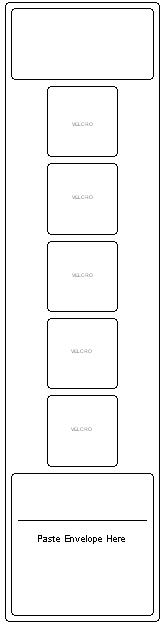
Episode #17 is up for your listening pleasure. In Episode #17 linear visual schedules are discussed. Below you will find examples of both horizontal and vertical linear schedules. Enjoy!
A.T.TIP #29: Linear Visual Schedules
Horizontal:
Vertical:
All of these schedules were created using Boardmaker software. If you’re like, “Hey, what the heck is Boardmaker software?” check out Mayer-Johnson’s website.
Here is a link to the Cystic Fibrosis Foundation fund raising site. Please click on the “Make a donation” button to donate! Even the smallest amount can make the biggest difference.
Hey everyone,
Episode #16 is up for your listening pleasure. In Episode #16 I answer questions from e-mails and voicemails submitted by “listeners” to the show. Four new A.T. TIPS are discussed in the show.
A.T.TIP #27: JUICYSTUDIO.COM for Website Readability Statistics
Here is the link to the Website Readability Statistic Tool. Make sure you scroll down a bit to see it. Simply place the URL of the website you want analyzed and hit “Calculate Readability”.
This online dictionary provides an auditory version of each word along with many cool games.
Here is a link to the Cystic Fibrosis Foundation fund raising site. Please click on the “Make a donation” button to donate! Even the smallest amount can make the biggest difference.
Hey everyone,
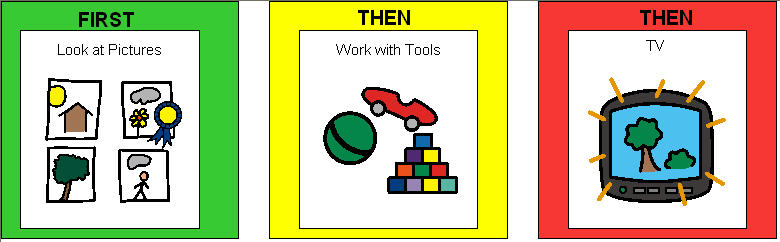
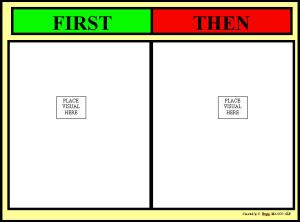
Episode #15 is up for your listening pleasure. Episode #15 describes how to create and implement a First-Then board with students who need help following directions or completing tasks.
Here are a few examples of first-then boards:
Here is a link to the Cystic Fibrosis Foundation fund raising site. Please click on the “Make a donation” button to donate! Even the smallest amount can make the biggest difference.
Hey everyone,
Episode #14 is up for your listening pleasure. Episode #14 features a description of television as an assistive technology tool. It describes a few shows and why they are good at what they do. Click on the names of the show to explore the website for that show. The shows discussed are as follows:
Here is a link to the Cystic Fibrosis Foundation fund raising site. Please click on the “Make a donation” button to donate! Even the smallest amount can make the biggest difference.
Hey everyone,
Episode #13 is up for your listening pleasure. Episode #13 features a description of Communication Bridges. A communication bridge is a way for students to talk about events that happened at school when they get home and talk about events that happened at home at school.
Here is one such example. Note that you can use visuals in replace of the lines or the text “PE, ART, Music” in the example below.
Today In School I…
Read this book: _______________
Worked on __________ in Math.
Learned about _________ in Social Studies.
Had this special: PE ART MUSIC
The thing I enjoyed the most today was:________________________
Last Night At Home I…
Read this book: _______________
Worked on __________ for homework.
Watched ____________ on TV.
Had ______________ for dinner.
The thing I enjoyed the most last night was:________________________
I hope you enjoyed the show and please feel free to leave a comment down below or drop me a line at attipscast@gmail.com
You can access the podcast from here:
Hey everyone,
Episode #12 is up for your listening pleasure. Episode #12 features a co-host, Mrs. B! Together we discuss how vocational tasks can be implemented for any student.
You can find examples of work jobs on the following websites:
I hope you enjoyed the show and please feel free to leave a comment down below or drop me a line at attipscast@gmail.com
You can access the podcast from here:
Hey everyone,
Episode #11 is up for your listening pleasure. Episode #11 describes the autosummarize feature of MS Word. I realize that the episode is just a quick rundown of how the feature works and I didn’t really get into what you’d use it for. I’m trying to keep the tips quick. So, I invite you to tell me how you might use this feature or tell me how you have already used the feature. Your story might just inspire someone else in how they could use it. Please send me an e-mail, record a message and send it to me or post a comment here.
You can find whole tutorials on autosummarize for your version of MS Word here:
I hope you enjoyed the show and please feel free to leave a comment down below or drop me a line at attipscast@gmail.com
You can access the podcast from here:
Sorry this post is up about 24 hours late, but here it is!
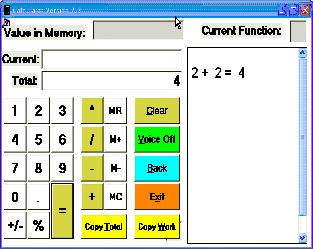
Episode #10 is up for your listening pleasure. Episode #10 describes the free software Talking Calculator. You can access a link for the free download from www.premierathome.com/products/TalkingCalculator.php.
Here is a screenshot of what it looks like once it is installed:
I hope you enjoyed the show and please feel free to leave a comment down below or drop me a line at attipscast@gmail.com
You can access the podcast from here:
Hey everyone,
Episode #9 is up for your listening pleasure. Episode #9 describes the free software add-on for PowerPoint called PowerTalk. PowerTalk is an open source, free download that reads the text on a PowerPoint presentation outloud. You can access a link for the free download from http://fullmeasure.co.uk/powertalk/.
Once you have it installed on your computer you simply navigate to your PowerPoint presentation file, right-click and then select “Narrate With PowerTalk”.
I hope you enjoyed the show and please feel free to leave a comment down below or drop me a line at attipscast@gmail.com
You can access the podcast from here:
This website is the personal website of a web designer named, Emily Change, out of San Francisco. There is so much out there and so many new web applications updating every day, this site can keep you up to date on the latest Web 2.0 applications.
This is a great resource to find free sounds. I think one under utilized activity for students with difficulties following directions or auditory processing difficulties is listening to and discriminating between sounds. Sounds can be used as story starters as opposed to the traditional text-based or picture based story starter. Sound effects can be used to enhance digital storytelling activities, movie making activities, or student produced podcasts. Adding these sounds might allow the students to feel like their production has a polished and fun quality.
Number 1- Mail Merge functions of Publisher to create Picture Dictionaries and Identification Cards
A teacher from Norfolk public schools named Jennifer Durkin presented on different ways she uses Publisher. One strategy she showed what how you could take lists of items in Excel and Merge them with templates created in Publisher to easily make picture dictionaries and identification cards. Picture dictionaries are a great way for students to review difficult spelling words, review vocabulary from any content area, or maintain their own “difficult for me to remember” list of words. Identification cards are also a useful tool for students with communication difficulties. The ID card might have saying on them like “My name is… and I am lost” or “Can you call my mom for me? My phone number is …”. I wrote Jennifer and she gave me permission to post her hand-outs here. vste-presentation-handout.pdf
I hope you enjoyed the show and please feel free to leave a comment down below or drop me a line at attipscast@gmail.com
You can access the podcast from here:
Number 5- www.prometheanplanet.com. You can download free ActivStudio lessons from this website. If you don’t have ActivStudio, you can download the free FlipChart Viewer from here: FlipChart Viewer
Number 4- www.picnik.com. A fun online, free photo editing tool. It is very easy to upload pictures, edit the pictures, and apply different effects to the pictures.
I hope you enjoyed the show and please feel free to leave a comment down below or drop me a line at attipscast@gmail.com
You can access the podcast from here:
Hey everyone,
Episode #6 is up for your listening pleasure. Episode #6 is the first episode with the new format. Let me know what you think. The tip for this episode is http://www.readplease.com/. Readplease is free piece of software that you can download. It is a text reader/talking word processor. That is, you can copy/paste text right into it and it will read it out loud. You can also type right into the program and it will read it aloud.
I hope you enjoyed the show and please feel free to leave a comment down below or drop me a line at attipscast@gmail.com
You can access the podcast from here:
Hey everyone,
Episode #5 is up for your listening pleasure. Episode #5 briefly explains the my take on the convergence of the educational concepts of Universal Design for Learning, Least Restrictive Environment, and Differentiating Instruction using Assistive Technology. I also explain that future episodes will have less me talking about the principles of AT practice in public schools in favor of trying to fit in two tips per episode. Please let me know what you think about the format change. Good thing or bad thing for the show, what’s your take?
The tip for this week’s episode is on “Pacing Boards”. Pacing Boards are simply circles used to facilitate language development. You can watch a short movie on Pacing Boards here : Keeping Pace
I hope you enjoyed the show and please feel free to leave a comment down below or drop me a line at attipscast@gmail.com
You can access the podcast from here:
Hey everyone,
Episode #4 is up for your listening pleasure. Episode #4 contains a short synopsis of my take on FETC 2008 as well as the top 5 things I learned at FETC 2008 (Florida Educational Technology Conference). During the show I mentioned that I would post some movies and links. I hope you enjoy them and find them useful in your teaching practice.
#5: Frequency of Web 2.0 Applications is Increasing In Education
#4: Classroom 2.0– Social Networking site for educators
#3: Using Your Noodle On The Moodle (Alan Taylor)- Presentation Style Can Be Free Form, Dynamic and Non-scripted/rehearsed
#2: The Amazing Math Toolbox For Teachers (Ian Prietz)- Handouts with links to math resources (some free)
#1: www.voicethread.com– Allows users to post a picture and allows other users to have access to leave voice comments or text comments on the margins surrounding that picture.
I hope you enjoyed the show and please feel free to leave a comment down below or drop me a line at attipscast@gmail.com
You can access the podcast from here:








 The Compendium Blog of The A.T.TIPSCAST